
What to play
Forza Horizon 5 on Android: Launching and Setting Up Controls
Launch Forza Horizon 5 on your Xbox or in the cloud and stream it to Android through XBPlayer. Check access, set up controls and start with a free-roam drive.
On this page
You can play Forza Horizon 5 on Android by streaming: your Xbox or Xbox Cloud Gaming runs the game, while the phone displays the picture and sends your inputs. XBPlayer offers both options. First check game access, then connect and take a short free-roam drive to set up steering, throttle and brakes.
Choose the game source: your Xbox or the cloud
Remote Play suits an Xbox One or Xbox Series X|S with Forza Horizon 5 installed and permission to launch it. The game runs on your console; only the streaming client is installed on Android. Before setup, make sure Forza launches on Xbox under the correct profile.
Xbox Cloud Gaming lets you play without your own console. As of October 22, 2026, the base Forza Horizon 5 Xbox Store listing shows cloud access with the game included for Game Pass Premium and Ultimate; streaming with Essential requires a game purchase. Check access under your account in a supported region: terms depend on the plan and edition. Game Pass Premium and the game's Premium Edition are different purchases.
XBPlayer does not include Microsoft games or subscriptions. You do not need to install the Xbox version of Forza on your phone. Client and cloud-service payment terms are covered in the XBPlayer and Game Pass guide.
Connect to Forza through XBPlayer
- Install XBPlayer using the link on the official website and sign in to the Microsoft account with the Xbox profile you need. If using a controller, connect it to Android by Bluetooth or USB.
- For Remote Play, enable remote features on Xbox. For the first connection, leave the console on and connect your phone to the home network. In XBPlayer, select your console, connect and launch the installed Forza game. Full preparation is covered in the first Remote Play session guide.
- For the cloud, open the Xbox Cloud Gaming library in XBPlayer, find Forza Horizon 5 and launch the edition available to your account. If the service asks for a purchase or subscription, check the account, edition and access terms first.
- Wait for the game to appear and check controls in its menu. On a first launch, complete the introduction; choose a free-roam drive for your check once the game unlocks it.
If Remote Play will not connect, check that Xbox is on and remote features are allowed. To connect to a sleeping console, configure and test remote wake in advance. If only cloud Forza fails to open, start with its listing and your account entitlements; moving on-screen buttons will not help.
Check throttle, braking and steering
Choose a car you find easy to handle and a section with a straight and a gentle corner. Accelerate first, then release the throttle and brake at a chosen landmark. Repeat the same route with a turn. This makes delayed response or an awkward button easier to notice than in a crowded race.
In Forza's own difficulty settings, choose assists to suit your experience. To begin, you can enable the racing line and automatic shifting. Keep these settings unchanged while comparing control options; otherwise, it becomes difficult to tell what changed the car's behavior.
With a physical controller, check not just whether inputs register but how smoothly the stick and analog triggers respond. A light press and a full press should let you apply different amounts of throttle or braking if your controller supports it. Then check camera switching and opening the map. If an action is awkwardly assigned, compare Forza's control settings with XBPlayer remappings.
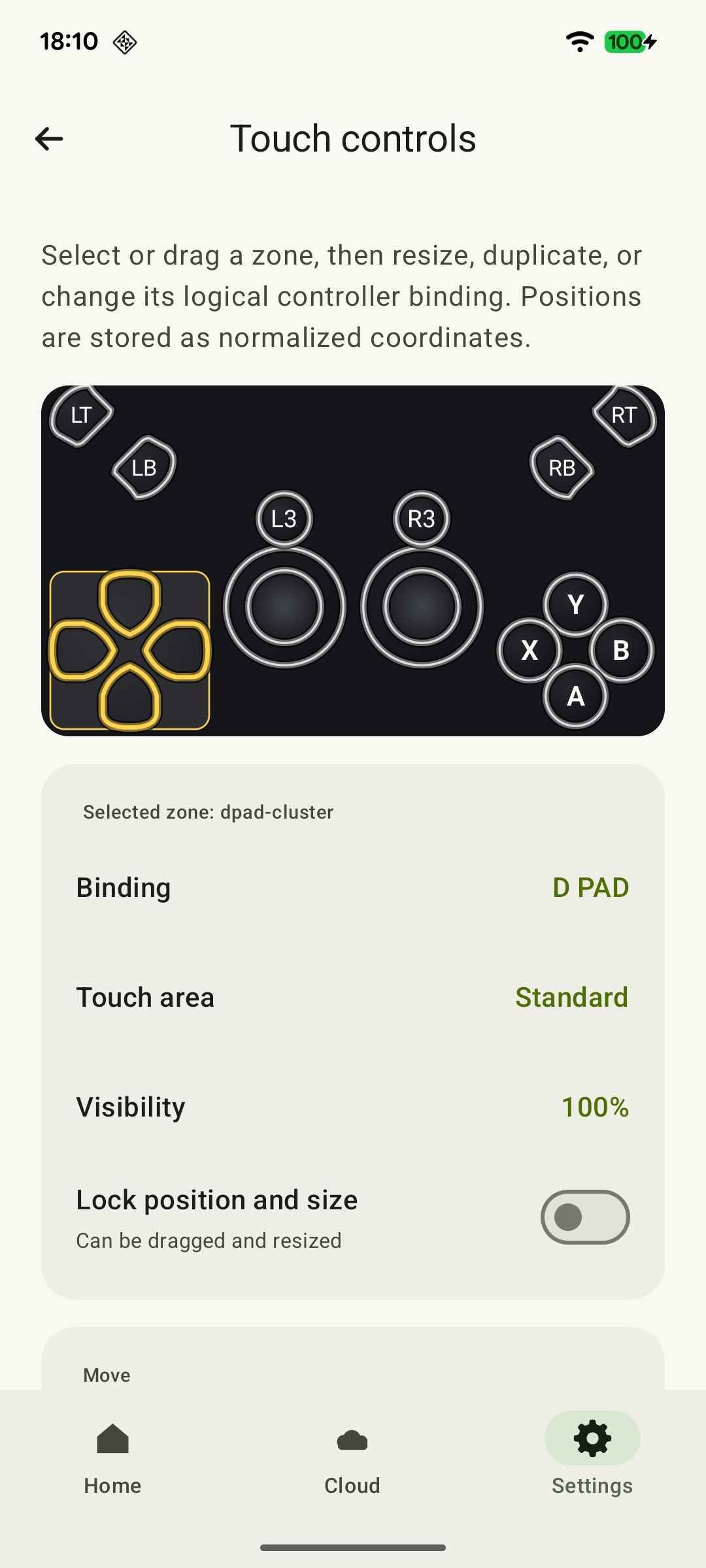
Arrange on-screen buttons for steering and braking
On phones and tablets, you can use XBPlayer's on-screen controller. These controls are supplied by the streaming client; their presence does not mean Forza supports native touch buttons in browser-based Xbox Cloud Gaming.
 Enlarge screenshot
Hold the throttle and steer at the same time. Then release the throttle and try braking while continuing to steer. If reaching the brake means letting go of the on-screen stick or changing your grip, move the controls. Keep the road ahead and minimap clear. These combinations are covered in the racing touch-layout guide.
Save a layout that works before making further changes. To make a button obscure less of the road, increase its transparency. If you do not need it and it interferes with touch input, delete it from the layout: a fully transparent control can still respond to touches.
Choose a camera and a readable interface
Compare several camera views on the same corner and choose one that shows the road and braking marker early. Separately, open the map and car-tuning menu. If text is small, try the text-size options in Forza's accessibility settings.
A tablet gives you a larger image, but some buttons require a longer reach, so reassess your grip. XBPlayer is also available on Android TV; a television requires a compatible physical controller. Make sure the app is available for your model and assess map readability from your usual playing position.
What to change when the car feels awkward to control
- Your finger misses or hits a neighboring button. Change one control's size or position and repeat the corner.
- The car reacts too sharply while the picture stays smooth. Check Forza's controls and assists, then compare the response to a small stick movement. A sharp response does not by itself establish a network problem.
- The whole picture freezes or inputs arrive noticeably late. Stop background downloads and repeat the route near the router. For Remote Play, connect Xbox by Ethernet if possible. Compare FPS and the increase in the lost-video-packet counter over sections of equal duration. Accumulated totals from different sessions are not directly comparable; the diagnostics guide explains these readings.
Once the controls feel predictable, choose an available solo race. Move on to online races afterward: free roaming helps with setup, but does not check every condition of racing against opponents. Find alternatives in the Xbox racing games for Android roundup.
After getting comfortable with the car, choose an available solo road event, reach the finish and return to exploring Mexico. If you want a new campaign in Japan, Forza Horizon 6 has its own launch guide; FH5 remains a good choice for your existing collection and progress.
Ready for your first drive
A summary of the initial setup: mark the outcome, and see the detailed steps above. If something gets in the way, describe it in the form below.
Throttle and steering work together
You can steer while holding the throttle and keeping the road in view.
Touch layout for Xbox racing games: throttle, brake and steering →You can release the throttle and reach the brake
You can lift off the throttle and brake into a corner without changing your grip on the device.
Touch layout for Xbox racing games: throttle, brake and steering →The route is clear
Your chosen camera shows the next corner and a readable minimap.
Small Text in Xbox Games on Your Phone: What You Can Adjust →You have completed an activity
You finished your chosen solo race or route and waited for progress to save.
Once the controls feel predictable, move on to a solo race. Before an online race, also assess the connection and response while playing against opponents.
Sources and further reading
- Forza Horizon 5 — Xbox Store — Base game: Xbox One and Series X|S; cloud access with Premium/Ultimate, purchase required for Essential.
- Xbox Remote Play — Streaming installed games from your own Xbox One or Series X|S with remote features enabled.
- Xbox Cloud Gaming — Xbox Cloud Gaming: supported games, regions, devices and access requirements.
- XBPlayer: Features and Platforms — XBPlayer: Remote Play, Xbox Cloud Gaming, controller support and customizable on-screen controls.
- Touch Controls: Make Them Your Own — XBPlayer on-screen control positions, sizes and transparency, saving layouts and deleting unwanted buttons.
- Xbox Wire: Forza Horizon 5 Controls and Accessibility Features — Driving assists, the racing line, gear shifting, cameras and control remapping.
- The Accessibility Features of Forza Horizon 5 — Xbox Wire — Adjustable gameplay and menu text size.
Get the key points
Open a summary request with this article’s link. For Gemini, the request is copied — paste it into the chat.