
Start playing
An Xbox game you own asks you to buy it again: account, license and cloud
First identify whether the purchase prompt appears on your Xbox or in the cloud. The two modes check different rights; paying for the client again will not add them.
On this page
If a game you bought asks for payment again, first identify where the problem appears: your Xbox, Microsoft's cloud or XBPlayer's balance. For Remote Play, check launch on the console under the gaming profile; for Cloud Gaming, check that edition's cloud launch under the account with the appropriate rights. Buying the paid client does not create a game license.
| What the message says | What to check first |
|---|---|
| Xbox asks you to buy the game or insert a disc | Gaming profile, your purchase/subscription, disc and home Xbox |
| There is no play button in the cloud | Cloud support for that exact edition and the selected account's rights |
| The XBPlayer balance has run out | Client terms in the minutes guide; do not buy the Xbox license again |
| The game is present but the save is different | Profile, edition and progress synchronization |
Check one title and one mode at a time. Prepare your Xbox gamertag, the full edition name and exact error. These help distinguish a wrong account, missing game rights and a connection problem.
First check the profile, purchase and subscription
- Check the gamertag. Compare the XBPlayer profile with the one used on Xbox or in the cloud. If the tag differs, select the right account. The XBPlayer sign-in guide has step-by-step checks.
- Identify how you have access to the game. It may come from your own purchase, a disc, a subscription or shared console access. For a Microsoft Store purchase, open the order history of the account that bought it. Check the title, edition and order status. If the order is missing, first check another account you own and the date range.
- Check the active subscription. Open Microsoft's Services & subscriptions under the owning account. Record the plan name and expiration date. Then check whether its terms cover the game and launch method you need.
An add-on, in-game currency and a full game are different purchases. Check the edition's contents on its store page. On a family console, the purchaser and player may be different people: a missing order in the player's account does not itself prove missing access.
For Remote Play, test launch on the Xbox itself
On Xbox One or Series X|S, select your gaming profile and launch the installed game. Wait for its menu, then open the mode you want: access to single-player does not always establish access to online multiplayer.
Microsoft’s Insider announcement describes digital entitlements for supported discs. Check availability on your console: disc eligibility, Xbox Play Anywhere and cloud access are separate conditions.
If the console asks for a disc, insert the appropriate one. If it reports a purchase or subscription issue, compare the message with the rights already checked. Game Pass is not required for Remote Play streaming itself, but may be needed for a subscription game or a particular online mode. These terms also appear in the XBPlayer listing.
After a successful local launch, connect through XBPlayer to the same console and check the active gaming profile again. If the same license error appears, investigate its cause on Xbox. If you cannot connect to the console at all, proceed to Remote Play troubleshooting: checking a purchase does not replace checking remote features and connectivity.
For cloud play, check this exact game under your account
Open the official Xbox cloud catalog in a supported browser, sign in to the same account and find the exact title. Make sure Cloud Gaming is available in your region. Try to launch and record the result: the game opens, a queue appears, access is requested or an error occurs.
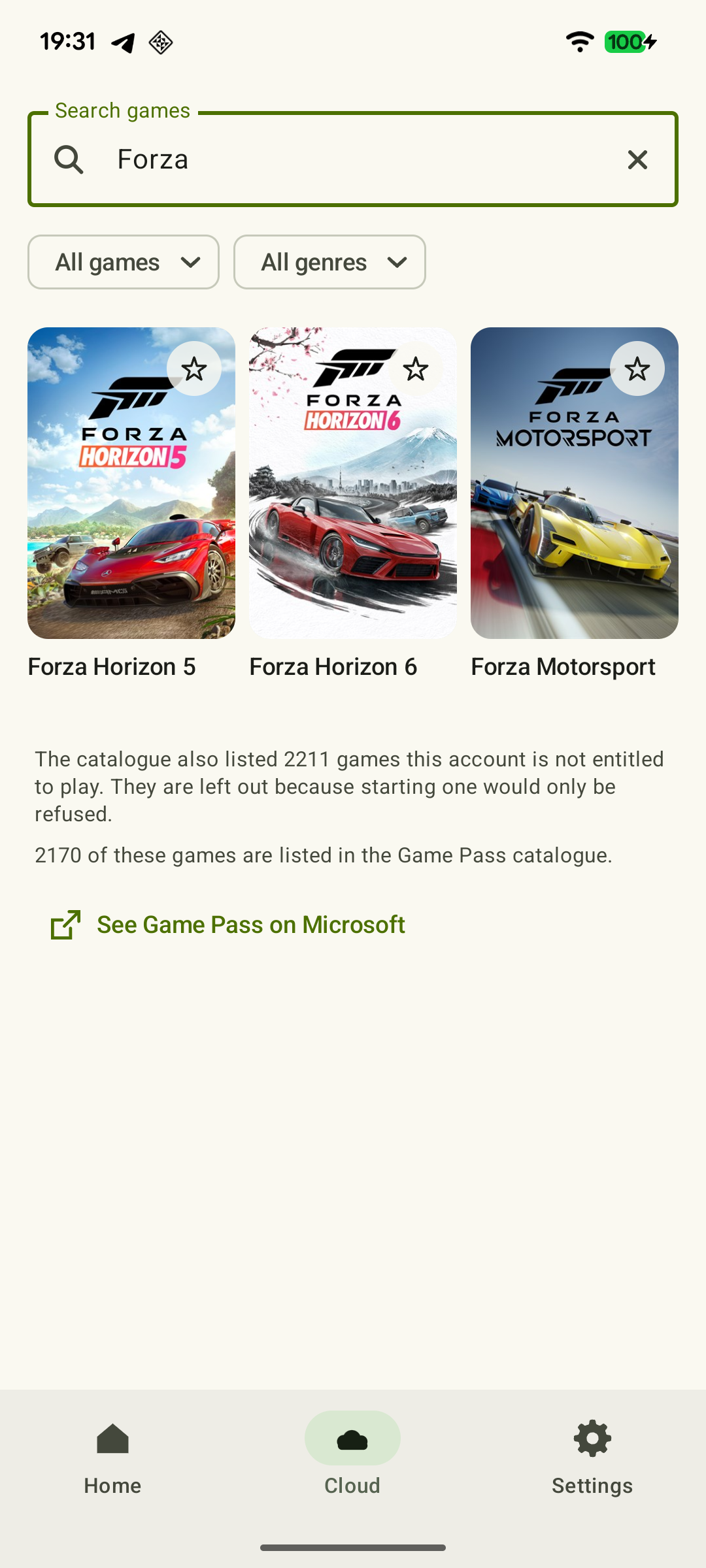 Enlarge screenshot
The cloud catalog is not the entire Xbox purchase library. Microsoft allows selected purchased games to be streamed; for other titles, a console license alone does not grant cloud launch. Access also depends on the specific plan and region. Supported free games may launch with a free Microsoft account; that exception cannot be applied to every free-to-play game.
If the service asks you to obtain access, recheck the account, edition and game terms first. A queue alone does not mean you need to buy again. Payment terms and announced cloud-service changes are covered in the Game Pass and cloud hours guide.
If a game is unavailable in the cloud but runs on your Xbox, you can use Remote Play. In that case the game runs on your console, not a Microsoft server. See Remote Play and Cloud Gaming differences for more.
On a family console, distinguish the rights holder from the player
The home Xbox mechanism lets other profiles on that console use the owner's eligible shared content. A game may therefore run under your profile even though a family member bought it. Microsoft separately explains sharing games and add-ons on a console; consumable purchases such as in-game currency are not automatically shared.
A successful launch on a home Xbox does not establish another family member's right to a separate cloud session. Check their account in the official cloud catalog. Do not switch to someone else's profile simply to get past an error: establish what access your own profile has first. If the message concerns age or parental permission, the family organizer needs to address it.
What is paid for separately in XBPlayer?
The paid version of XBPlayer removes the app's ads and time-balance requirement. It does not include games, Game Pass or Microsoft cloud access. Free-mode XBPlayer minutes also cover only client use. An error about the app balance must be distinguished from an Xbox license or subscription message.
Where to take your check results
- The game also fails on Xbox or in the official cloud service. Contact Xbox support about the account, order or access. If the error concerns a separate publisher account or service, use that publisher's support.
- The official method works but XBPlayer reports an error. Give XBPlayer support the game name, mode, client version, device model and exact error. Explain that you compared the same profile and edition.
- The game launches but the expected progress is missing. Check the profile and game version using the Xbox and cloud saves guide. Buying again is not a way to restore saves.
Do not include passwords or sign-in codes. The results of the two launch attempts and the error message are enough for an initial inquiry; there is no need to pay for the game or subscription again before finding the cause.
Which access requirements have been confirmed?
Check the required mode and exact game edition. These checks are independent: one result does not confirm the others.
The right gaming profile is selected
Compare the gamertag in XBPlayer with the one that holds your playthrough. If they differ, choose the correct Microsoft account you own and launch again.
How to sign in to XBPlayer and check your Xbox profile →The game works on your Xbox
For Remote Play, test the installed Xbox version under your gaming profile. If a purchase is requested, check the disc, edition contents, subscription or home-console sharing; a missing order in the player’s account does not always mean no console access.
The game is available to your account in the cloud
Check the exact game under your account in the official cloud catalog. A purchase and a successful launch on the family Xbox do not by themselves establish a right to a separate cloud session.
How to find a game in XBPlayer: console library and cloud →The message concerns XBPlayer itself
If the client reports its own time balance, check XBPlayer terms. Its paid version and minutes do not replace a game purchase, Game Pass or Microsoft cloud access.
XBPlayer free mode and Pro: minutes, purchases and restoring access →If a different save opens, stop before continuing and check the profile and version. Do not buy the game again just to test an error.
Sources and further reading
- XBPlayer — official website — Client features and the central starting point for downloads.
- XBPlayer: Remote Play & Cloud — Google Play — Hetko app; Remote Play/Cloud, cloud game search, Android minutes and Pro. Check the type and price of a specific purchase offer in that offer.
- Xbox Remote Play — Microsoft — Xbox One/Series, remote features and separate requirements for games and online modes. The official web route's system requirements are not XBPlayer requirements.
- Xbox Cloud Gaming — Microsoft — Cloud catalog, supported devices, certain free games and selected purchased games. A separate announcement establishes the dates of monthly limits.
- Microsoft: view your order history — Select the purchasing account and date range, and view the order status at account.microsoft.com/billing.
- Microsoft: manage subscriptions — Services & subscriptions: view subscriptions in the account that owns them.
- Microsoft Learn: Product sharing model for games — Sharing on a home Xbox and the distinction between the purchaser and player. Consumable purchases, such as in-game currency, do not automatically become shared.
- Upcoming Changes to Xbox Cloud Gaming — September 3, 2026 — Monthly allowances of 5/10/15 hours were announced for November 2026; those monthly limits do not apply before the change. No exact day or universal price was announced.
- Cloud Playtime for Xbox Insiders — October 21, 2026 — Buying hours without active Game Pass is a limited Insider preview; broader availability was announced for November.
Get the key points
Open a summary request with this article’s link. For Gemini, the request is copied — paste it into the chat.