
What to play
Warzone on Android Through Xbox: How to Launch and Continue
Stream Warzone to Android from your Xbox or the cloud. Choose a launch method, check your Activision account and set up controls before a match.
On this page
You can play console Call of Duty: Warzone on Android through Xbox Remote Play from your console or through Xbox Cloud Gaming if you have cloud access. The phone receives a video stream and sends control inputs. This does not install Warzone on Android: the separate Warzone Mobile service has closed, and Call of Duty: Mobile is a different game.
Warzone, Warzone Mobile and Call of Duty: Mobile: which should you choose?
| Product | How it works on Android |
|---|---|
| Call of Duty: Warzone | In this guide, the Xbox version streamed from your console or the cloud |
| Call of Duty: Mobile | A standalone mobile game installed on your phone |
| Call of Duty: Warzone Mobile | A closed service: servers were shut down on April 17, 2026 |
Activision's notice confirms the Warzone Mobile closure date. An old APK will not restore server access. The mobile game's closure does not mean your Activision account was deleted: it remains available on the website and in other games that use it.
For a game installed directly on your phone, look at Call of Duty: Mobile. Its modes and content are separate; signing in to Activision does not turn it into console Warzone.
How to play console Warzone on Android
Choose an available game source. Check Xbox One and cloud terms before configuring streaming or paying.
Xbox Series X|S → Remote Play
Launch Warzone on the console and reach its menu. Then enable remote features and connect XBPlayer. Warzone itself on a supported Xbox does not require a paid console multiplayer subscription.
How to prepare Xbox for Remote Play: remote features and Sleep →Xbox One → only within the remaining support period
If Warzone is already in your library, Activision allows play until the end of Black Ops 7 Season 06. Xbox One support ends with Modern Warfare 4 Season 1; the notice gives no calendar date. Check the current stage in Activision's notice and try launching on the console.
Xbox Cloud Gaming → no console required
You can choose the cloud even if you own an Xbox. Under your Microsoft account, check Warzone's listing, region and plan before paying; free console Warzone does not make cloud play free.
How to start Xbox Cloud Gaming on Android with XBPlayer →Before a match, compare the Xbox profile and Activision ID regardless of launch method. If progress is missing, check sign-in and the original account link first; do not unlink accounts at random.
Remote Play: launch the game on Xbox first
For a new Warzone installation on Xbox, use Series X|S. Xbox One follows the transition schedule in Activision's notice:
- New downloads from the digital storefront ended on June 4, 2026.
- If Warzone is already in your Xbox One library, Activision allows installation and play until the end of Black Ops 7 Season 06.
- Warzone will become unavailable on Xbox One with Modern Warfare 4 Season 1. The notice gives no calendar date for this stage.
Before setting up Xbox One, check Warzone access under your profile. Remote Play does not extend game support beyond the stated stage.
- Launch Warzone on Xbox under your usual profile. Wait for updates and required components to install, then reach the game menu. If it will not launch here, fix the console error first.
- Enable Xbox remote features using the Remote Play setup guide. It is convenient to check the first connection at home with the phone and console on the same network.
- Open XBPlayer on Android, sign in to the correct Microsoft account and choose a Remote Play connection to your console. You should see your Xbox on the phone; the game itself continues running on the console.
Warzone's online mode on a supported Xbox does not require a paid console multiplayer subscription. This rule applies specifically to Warzone: if Call of Duty asks you to buy a game or subscription, check which section you opened first. Access to other games in the series is determined separately.
Xbox Cloud Gaming: no console needed, access checked separately
As of October 22, 2026, Warzone's Xbox listing shows cloud play with Game Pass Essential, Premium and Ultimate. Warzone itself being free does not make cloud play free. Buying XBPlayer does not provide a subscription or cloud-service rights either.
- Sign in to Xbox Cloud Gaming with the Microsoft account you plan to use in XBPlayer.
- Open the Warzone cloud-catalog listing and check access for your account and region. Before subscribing, make sure the chosen plan allows this game to launch.
- In XBPlayer, choose the cloud library and Warzone. The first-connection steps are in the Xbox Cloud Gaming on Android guide.
If the launch button is unavailable or an entitlement error appears, check the account, region and subscription terms using the cloud-launch error guide. Reinstalling Warzone on your home Xbox will not fix the cloud account's rights.
Continue your progress without disrupting account links
The Microsoft account determines the Xbox profile, while Warzone's online progress is stored in the Activision account. Check both before a match: the correct Xbox profile should be linked to your previous Activision account. Compare the Activision ID and familiar progress. With Remote Play, you continue the same console game; no separate Android character is created.
If progress is missing, do not unlink the Xbox profile at random. Relinking to another Activision account does not transfer earlier progress. First check which profile you used to sign in to Xbox and which Activision account is linked to it. The XBPlayer sign-in guide helps with choosing a Microsoft account.
Progress and purchases follow different rules. According to Activision's COD Points support, the currency balance is tied to the platform account where it was bought or earned. Items purchased with COD Points are available on linked platforms except exclusive content; real-money purchases are tied to the platform account. When switching platforms, check the specific purchase. These Warzone rules do not promise content transfers to Call of Duty: Mobile.
Check aiming, looting and visibility
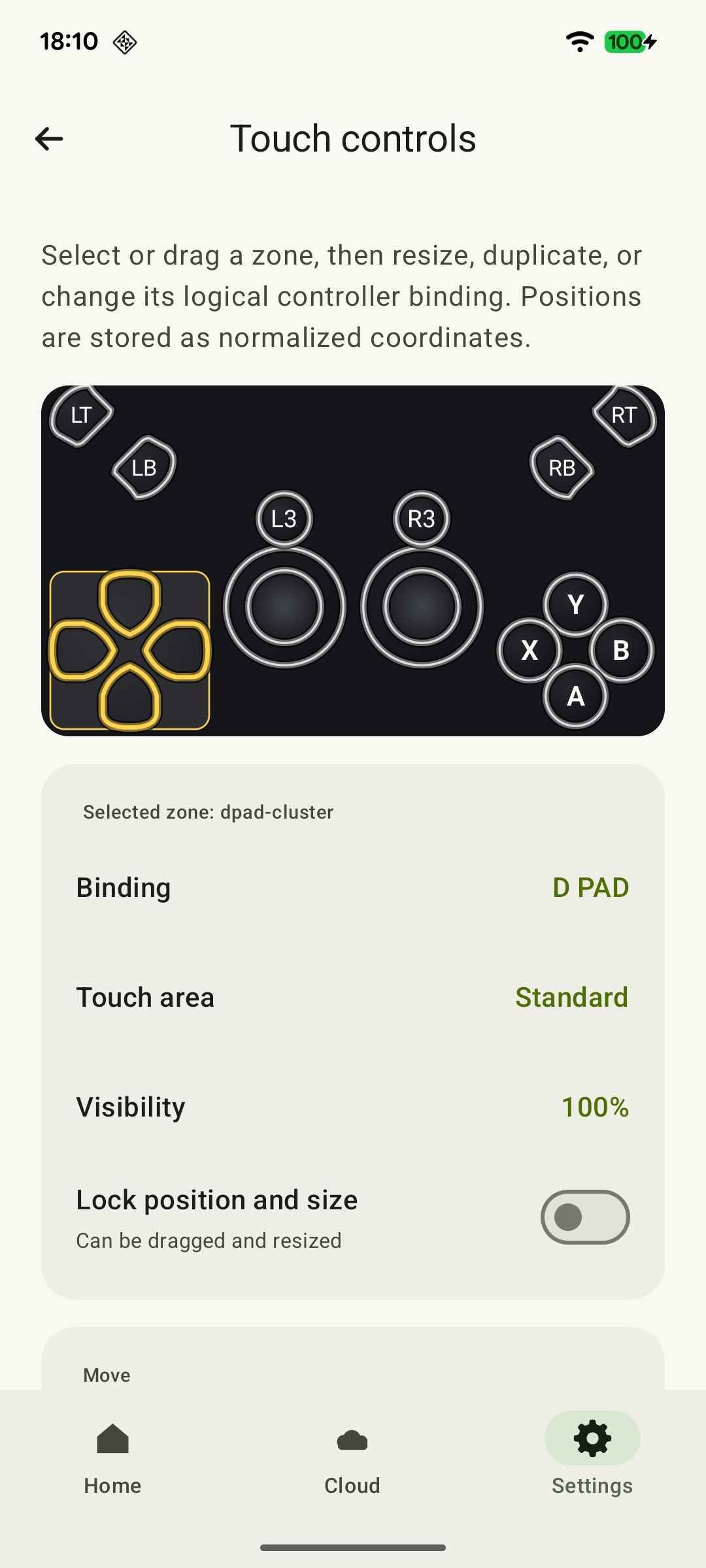
For the first check, connect a compatible physical controller to Android. Warzone's cloud listing specifies controller input. XBPlayer on phones also supplies touch sticks and buttons over the picture; these are a streaming-client feature, not a mobile Warzone version.
 Enlarge screenshot
Before a regular match, open controller settings and complete available training if the current version of your chosen mode offers it. If there is no training, learn the menus and assignments first; plan the first regular match as a full game you will finish with your squad. It is not a substitute for a safe place to spend a long time rearranging controls.
Distant silhouettes, item labels and markers need to be distinguishable on your phone. With touch controls, check whether you can track targets and press commands without changing your grip. Button placement is covered in the shooter layout guide. Repeat the same sequence after a change. If Remote Play inputs are noticeably delayed, use the Remote Play latency check before changing aim sensitivity.
Check voice before a squad match
Agree on a communication method and ask teammates to confirm they can hear you. Hearing game audio in headphones does not establish that your microphone is being transmitted through the client you use. If voice is missing, check the selected input device and microphone permission in your communication app first.
In the first regular match, choose a drop location with your squad, gather equipment and play through to the end. For an Xbox party through Remote Play, enable the microphone with the Party Chat guide; Warzone's in-game voice and Discord have separate settings. If picture or input problems get in the way, investigate them before the next squad match.
Sources and further reading
- Activision: Warzone Mobile Service Changes — Warzone Mobile servers closed on April 17, 2026; the Activision account remains available outside that app.
- Activision: Warzone Platform Update — Stages of the Xbox One support phaseout in 2026: download restrictions, store closure and the end of play when Modern Warfare 4 Season 1 begins. Separate terms apply to existing libraries.
- Call of Duty: Warzone In-Game Account Registration — Activision progress and the consequences of changing the linked account.
- Using COD Points in Call of Duty: Warzone — Currency and purchase rules across platforms.
- Xbox Remote Play — Streaming installed games from your own Xbox One or Series X|S with remote features enabled.
- Call of Duty: Warzone — Xbox Store — Free-to-play game and Game Pass plans for cloud play.
- Play Call of Duty: Warzone — Xbox Cloud Gaming — The game's cloud listing, access plans and controller input.
- Xbox Cloud Gaming — Xbox Cloud Gaming: supported games, regions, devices and access requirements.
- Call of Duty: Mobile FAQ — A standalone mobile game for Android and iOS.
- XBPlayer — Remote Play and Xbox Cloud Gaming — XBPlayer: Remote Play, Xbox Cloud Gaming, controller support and customizable on-screen controls.
- Online Multiplayer for Free-to-Play Games Unlocked Starting Today — No paid subscription requirement for console multiplayer in free-to-play games; Warzone is included in the list.
Get the key points
Open a summary request with this article’s link. For Gemini, the request is copied — paste it into the chat.