
What to play
Stardew Valley on Android: Mobile Game or Your Xbox Farm?
Use Remote Play for your Xbox farm. The separate Android version has its own saves, touch modes and a way to save during the day.
On this page
To continue an Xbox farm on Android, connect to your console through Remote Play in XBPlayer. The game and save stay on Xbox, while your phone provides the screen and controls. The separate Stardew Valley app from Google Play runs on Android itself and uses mobile saves: installing it will not open your console farm.
How mobile Stardew Valley differs from Xbox streaming
| What we are comparing | The Android game | Xbox through Remote Play |
|---|---|---|
| Where the game runs | On the phone; a separate mobile version is required. | On your Xbox; the phone receives picture and sound and sends control inputs. |
| Which farm opens | A mobile save. | The selected Xbox profile's save. |
| Controls | Touch modes, a virtual joystick and external controller support. Automatic tool selection and auto-attack are available. | Console-controller commands through a controller or XBPlayer's on-screen buttons. |
| When to save | Alongside end-of-day saving, mobile resume options and Save Backup are available. | Finish the in-game day and wait for saving. |
Mobile control and autosave features are listed in Stardew Valley's Google Play listing. Streaming to a phone does not add them to the Xbox version. An Xbox license and XBPlayer access do not replace entitlement to the separate Android game either.
How to open your Xbox farm on a phone
- Launch Stardew Valley on Xbox under the correct profile and make sure the farm is available. Note its name, character name, season and day.
- Enable console remote features and check the connection from your home network. Full preparation is covered in the first Remote Play session guide.
- In XBPlayer, sign in to your Microsoft account, choose the console connection and launch Stardew Valley.
- On the game's load screen, compare the farm with what you saw on Xbox. If it is missing, check the profile and selected console first. Do not start a new playthrough hoping it will pick up the old save.
XBPlayer does not copy farm files to Android. Instructions for moving saves between PC and a phone concern other versions of the game; they are not needed to continue an Xbox farm through Remote Play.
Why tapping a crop works differently
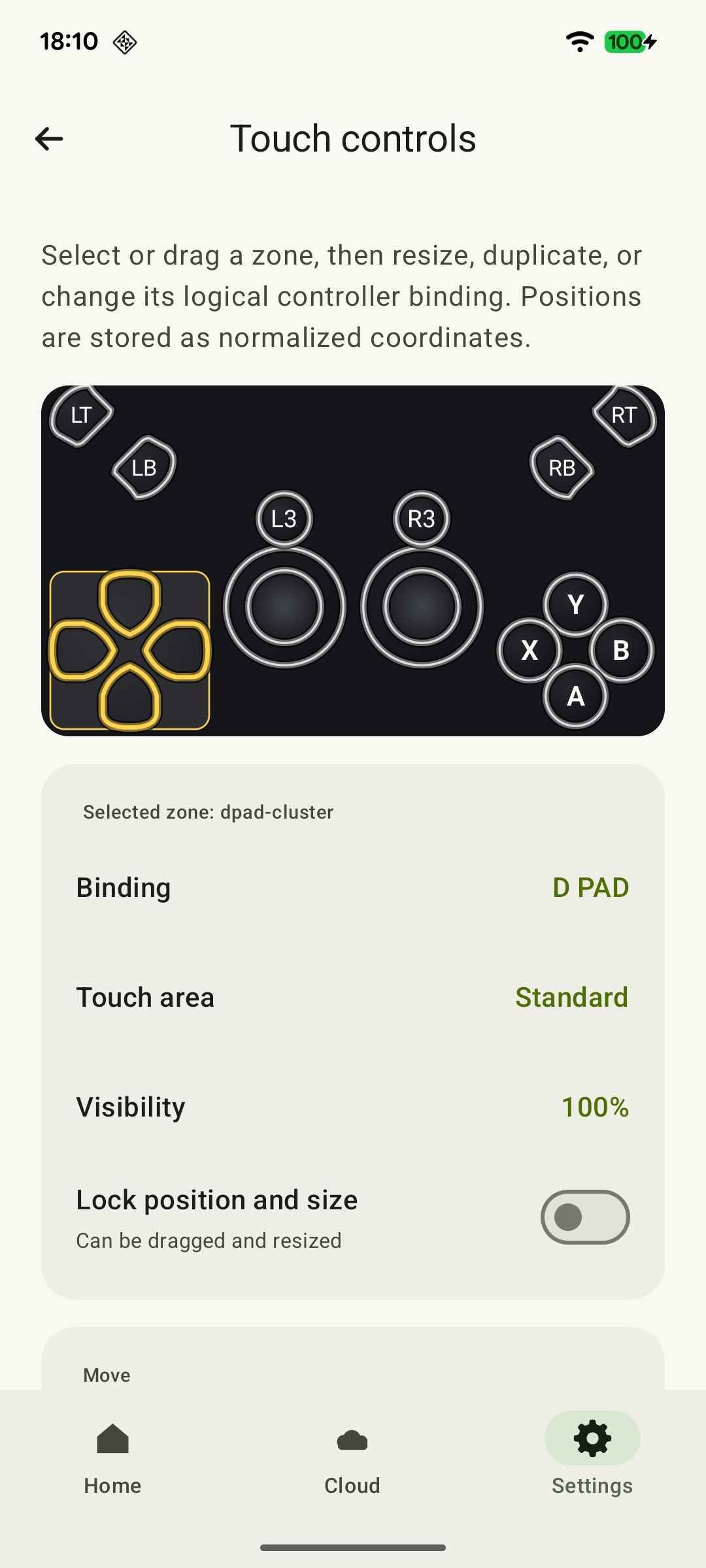
In the mobile game, touch controls are built into Stardew Valley. With Remote Play, touching XBPlayer's on-screen buttons sends controller commands to the console version. Tapping a planting bed in the picture therefore does not become a mobile action: you control the character and tool through your chosen layout.
 Enlarge screenshot
Position buttons so you can see the item bar, clock and energy. Separate action and cancel so you do not confuse them in the inventory. Save a working layout first, then change one control at a time; see the touch-control guide. A compatible physical controller keeps your fingers off the screen.
Your first day on a phone: crops, a chest and fishing
- Crops and tools. Walk between rows, switch items on the bar and water several tiles. If you hit neighboring tiles, adjust control size or position and repeat the same route.
- A chest and icons. Move several familiar items. If commands work correctly but icons are hard to distinguish, clear buttons from the view or try a larger screen. This is a separate problem from input delay.
- Fishing. Check whether alternating between pressing and releasing feels comfortable in the minigame. An ordinary fish is enough for the check: a successful walk around the farm does not yet show how fishing feels.
Farm chores are enough for the first session. Once the basic actions feel familiar, move on to the mines and more difficult fishing.
How to end a session and save the day
In the Xbox version, normal saving happens at the end of an in-game day. Return home, go to bed and wait for saving to finish and the next morning to begin. Closing the game earlier may lose that day's work. In co-op, wait until everyone has passed the end-of-day screens and morning begins.
Disconnecting XBPlayer does not itself save the farm. If the stream drops, reconnect and check the game's state: losing the connection is not the same as quitting Stardew Valley. Before ending the game on Xbox, finish the day normally.
The separate mobile version has a resume mechanism after backgrounding and a Save Backup command in settings for saving during the day. This command is unavailable during some events; force-closing the app can interrupt writing. These features are described in the Stardew Valley Wiki mobile-saves reference and do not apply to Xbox streaming.
When to choose cloud play or the separate Android game
If your farm is already on Xbox, start with Remote Play to continue that console playthrough. If you want to run Stardew Valley on the phone itself and use mobile controls, choose the Android version with its own saves.
Stardew Valley is also listed for Xbox Cloud Gaming in the official Xbox listing. Cloud play does not need your own console, but access depends on the account, region and service terms. Before changing launch methods, finish the day and let Xbox synchronize the save, then check the farm in the cloud. If progress differs, start with the account and save-synchronization check.
For a short break, choose chores with time left to return home and sleep. The 15–20-minute gaming session guide can help you make a suitable plan.
Choose tasks that fit your farm's current state: watering, harvesting ripe crops or one trip to a fishing spot. Finish the day by returning home and sleeping—that is how the Xbox version records progress. The separate Android game suits a new mobile farm; Remote Play remains useful for continuing an existing Xbox farm.
Sources and further reading
- Stardew Valley — Google Play — Developer listing: a separate Android game, touch modes, external controller support, automatic tool selection, auto-attack and mobile autosaving.
- Stardew Valley — Xbox — Xbox One, Xbox Series X|S, Xbox Cloud Gaming and Xbox cloud saves. A listing does not guarantee access for a particular account or region.
- Xbox Remote Play — Streaming installed games from your own Xbox One or Series X|S with remote features enabled.
- XBPlayer — Remote Play and Xbox Cloud Gaming — XBPlayer: Remote Play, Xbox Cloud Gaming, controller support and customizable on-screen controls.
- Saves — Stardew Valley Wiki — Community reference: saving at the end of a day, a separate co-op condition, and transfers between PC and mobile platforms.
- Mobile Saves — Stardew Valley Wiki — Community reference: mobile resume after backgrounding, Save Backup and save-writing limitations.
Get the key points
Open a summary request with this article’s link. For Gemini, the request is copied — paste it into the chat.